
Flight crews widely use a checklist in aircraft cockpits. With increasing use of EFB, should we move checklists into an electronic form? Has paper had its day?
In this article, we look at the regulatory requirements for checklists and how we should produce them. We look at the available guidance material and look at how organisations can implement a change to electronic checklists using an EFB. However, throughout we lay out the challenges this transition brings and ask whether it is the right thing to do.
The CAA recently removed some really good guidance material on this topic from their website (November 2026) but fortunately we have retained copies for posterity. We have included links throughout.
Let’s get stuck in
Contents
- When checklists go wrong
- Why do we need checklists?
- What do the regulations say?
- Creating checklists
- Improving on paper
- Backup and resilience
- Implementing the change
- Conclusions
- Links
When checklists go wrong
To focus on the topic, let’s look at an example of where a checklist was found to be one of the root causes of the outcome of an accident.

Cougar Flight 91 was a Sikorsky S92 operating a daylight crew change operation on 12 March 2009 off Newfoundland, Canada. It was carrying 16 passengers and 2 crew and was 54 nautical miles offshore when it experienced a significant main gearbox oil leak. The crew diverted back to the mainland but during the transit, the loss of oil led to a failure of the tail rotor drive and an uncontrolled ditching.
Tragically, only 1 passenger survived. The detailed investigation uncovered many factors which contributed to the accident but one crucial point was that the company emergency checklists in use by the crew were poorly indexed, confusing and were not consistent with the latest flight manual. In addition, the procedure in the latest flight manual was in itself unclear and was subsequently amended.
Had correct guidance and direction been available and been followed, a controlled ditching may have been possible before the catastrophic failure.
There are good checklists and bad checklists. The intent of this article is to highlight the guidance that’s available to ensure your checklist is in the good pile. We have covered problems with other manufacturer’s checklists in our article EC135, Checklists and the “Red Button of Doom”
Why do we need checklists?
Let’s step back for moment. Why do we need checklists. Could we not just train pilots to remember things better?
Aircraft are complicated and whilst pilots do a great job of assimilating piles of documentation, recalling that information consistently is critical to safe operations. This applies to normal, abnormal and emergency operations.
A checklist provides a structured means of capturing processes so flight crews can refer to them and achieve the correct outcomes for given conditions. Humans are prone to errors and mistakes and a checklist is a good mitigation for this.

For example, if the pilot is conducting a normal start, the procedure should be clearly laid out in the checklist. An engine fire should be dealt with in a set procedure. Checklists do fall down slightly if something out of the ordinary happens but in general they are good foundation.
In some circumstances, flight crew need to respond immediately to something and there might be some immediate actions to complete. However, the checklist should be referred to when the situation is stabilised.
There are of course good checklists and bad checklists. The intent of this article is to highlight the guidance that’s available to ensure your checklist is in the good pile!
Checklists work in our safety critical industries too. Have a listen to the excellent book on the topic in the medical world – The Checklist Manifesto | Atul Gawande
What do the regulations say?
If checklists are so useful, clearly the regulations will mandate they are required for all operations and will give clear guidance on how they should be produced and used? Well not exactly.
As with most of the regulations, the rules and guidance are scaled to the complexity of the operation. There are two levels to consider:
- Non-commercial operations with non-complex aircraft under Part NCO
- Everything else including operations under Part NCC, Part SPO and Part CAT
Part NCO Checklists
The rules state in NCO.GEN.105
(a) The pilot-in-command shall be responsible for:
(3) ensuring that all operational procedures and checklists are complied with…
Further rules relating to checklists for Part NCO operations are found in AMC1 NCO.GEN.105(a)(3):
The pilot‑in‑command should have and use the latest checklists provided by the manufacturer or the operator, covering all phases of operation of the aircraft under normal and emergency conditions and situations.
This is followed with some guidance in GM1 NCO.GEN.105(a)(3)
- A normal checklist is a written list to confirm that safety‑critical actions included in the associated normal procedure have been performed.
- When normal checklists are not provided by the manufacturer, the operator may be required to develop normal checklists. The design and the usage of checklists need to observe human factors principles and take into account the latest relevant documentation and information from the manufacturer.
And that’s pretty much it. It’s the pilot-in-command’s responsibility to have and use a checklist. If no manufacturer exists, it is the operator’s responsibility (the operator may be the pilot for an operation outside a formal organisation). Checklists are available from pilot stores for popular models.

However, there is minimal guidance on how a checklist should be designed except that in the GM it says they need to follow human factors guidance. This very odd phrasing as GM is guidance and cannot express a need. Thus it is up to to the pilot, operator and manufacturer about what goes in the checklist.
Part CAT, Part NCC, Part SPO Checklists
For other types of operations, the guiding rule is Part ORO.GEN.110(h):
The operator shall establish a checklist for each aircraft type to be used by crew members in all phases of flight under normal, abnormal and emergency conditions in order to ensure that the operating procedures in the operations manual are followed. The design and the usage of checklists shall observe human factors principles and take into account the latest relevant documentation from the design approval holder.
So this time, the human factors principles is in the rule. We must consider it. As the checklist is parts of the Operations Manual, the very similarly worded ORO.MLR.100(k) also applies.
Guidance material?
So what about an AMC and GM to guide operators? Nothing is provided. Perhaps the authority thought to provide such information?
Well the UK CAA did just that in the form of CAP 676 and CAP 708 which cover the design and use of emergency checklists and electronic checklists respectively.
Then they deleted them in November 2026.

The CAA highlighted the documents “could not” be kept up to date with respect to references when EASA was created. It now seems since the UK left EASA, the documents are no longer useful and removed them.
This is of course not true. The references are indeed wrong but the guidance is sound. Strangely, the research paper that led to the issue of CAP 708 is still available on the CAA website. We have archived a copy just in case that gets deleted too!
Creating checklists
As the rules above highlighted, the source of any checklist needs to be the manufacturers documentation.
Modifications, upgrades and options
It’s important to note a very subtle but important point here. The text in ORO.GEN.115(h) says:
…take into account the latest relevant documentation from the design approval holder.
It does not say, the aircraft manufacturer. It means you have to consider all the modifications, options and upgrades the aircraft has too which might have separate design holders. We will return to this point later.
Aircraft manuals
So if we want the procedures to populate our checklists we need the aircraft manuals. So section 3 of the manual for emergency and abnormal operations and section 4 for normal operations. It’s like that on Airbus helicopters so it must be like that everywhere?
Well, no. As we covered in our article about flight manuals (Helicopter Flight Manuals – Bringing Order from Chaos), the layout of manuals has some scope for variation.
In any case, the flight manual is the binding document. So why not pull that out of the stowage and read that? Aside from it being an cumbersome nightmare and liable to explode across the cockpit due to failed bindings, there are other issues.
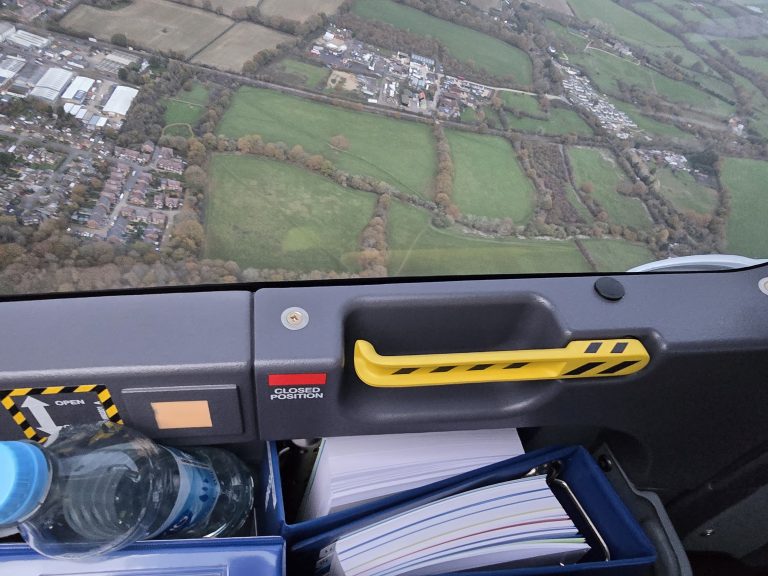
Problems with directly lifting checklists from the flight manual
In any case, we get the information we could just take the procedure from the manual and print it. Unfortunately, it is rarely that simple. There are several problems with just printing out the procedures:
- Flow
- The Flight Manual may not order the checklists in a natural flow. A normal start might be followed by the quick start in the manual.
- Temporary revision might be inserted
- Applicability
- The Flight Manual might have many different variations depending on the upgrade or options on the aircraft
- Manufacturer optional equipment
- Manufacturer approved optional equipment may be included in a supplement which may modify the actions in the main body
- Third party modifications
- Third party modifications may be in a supplement with inconsistent formatting to the main body
- Indexing
- The index is unlikely to easy access to the right page due to lack of thumb indexes and small page numbers
- Formatting
- A lack of colour and font changes may not make use of human factors to ease crew workload
- Page changes
- Crucial checklists may be split across pages due to the layout of the manual
Suffice to say, do not just print the manual out! This is particularly relevant when the aircraft has any changes from the stock factory machine. Even the movement of a particular control panel or switch could mean the flow of the flight manual checklist does not work for the actual machine.
Manufacturer checklists
Some manufacturers do the hard work and produce a manufacturer approved checklist in a handy form. This is the case on Airbus helicopters such as the EC135 and H145.
However, there are traps in these checklists. As we reported in our article EC135, Checklists and the “Red Button of Doom, there are significant issues with manufacturer checklists where one checklist is trying to remain applicable to an entire fleet of helicopters across multiple operators and across the world. The checklist simply will not reflect the actual fit of the aircraft.
Inappropriate drills
As we highlighted some procedures applicable to a basic VFR machine can be left in a checklist used on more complex single-pilot IFR machines. This could lead to highly inappropriate pilot responses in conditions that were never envisaged for the original procedure. We covered this in our article about Flight Manuals – Helicopter Flight Manuals – Bringing Order from Chaos.
This can be compounded if the correct drills for an optional piece of kit are not included in a checklist but the incorrect drills are left in. The crew might not even know the drill is inappropriate to their aircraft (again take a look at our article for more on this – EC135, Checklists and the “Red Button of Doom
Making improvements
The correct thing to do is highlight this issue to the manufacturer via their reporting process (eg Technical Enquiries (TE) for Airbus Helicopters – Get Technical Assistance | Airbus). Sometimes they change the procedure (eg the Fuel Low procedure on EC135 was changed as the result of a TE) and sometimes they refuse (eg the P/R SAS fail procedure on EC135). If the latter occurs operators need to highlight the issue through internal safety management procedures.
Missing procedures
A significant problem with manufacturer produced checklists is that optional equipment, particularly those items added to the aircraft under an STC are not included or the baseline checklist is not appropriately modified. As an example, a HEMS fit will include an oxygen system.
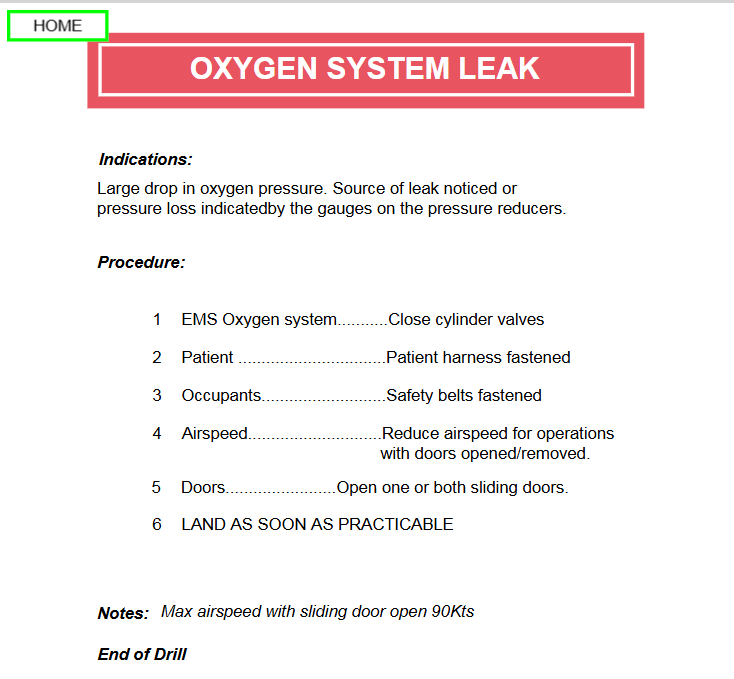
This will include emergency procedures for an oxygen leak. However, more importantly this will modify the extant procedures such as the FIRE drill where the oxygen system needs to be switched off as part of the procedure.
If you just rely on the manufacturer checklist as an operator, you are likely to be missing some very critical drills. Time for a rethink?
CAP 676 guidance
So we have located the procedures we need. What does the (now deleted) guidance from the CAA suggest we should do? Whilst CAP 676 is specifically aimed at emergency and abnormal procedures, we can lift some useful guidance applicable to all procedures. In particular there is the Checklist Audit Tool (CHAT) which is perfect for operators and compliance teams to ensure checklists are setup correctly. We will use it as a framework below. This is just a summary. The full CHAT is a great guide.
Physical characteristics
- Document size – can the checklist be handled easily by the crew and stowed in the available locations
- Binding – can the checklist be opened and held by the crew without holding open a page? Will the binding stay together in flight but also support amendment later? Does the binding obscure text?
- Cover – is the cover robust enough to protect the pages?
- Tabs and dividers – Do the tabs and dividers support finding the right procedures
- Font – Has non-serif lower case font been used (easy to read)? Is the print size appropriate
- Contrast and colour – Is the text high contrast with the page and is it easy to read by day and night (including under NVIS compatible light if applicable)
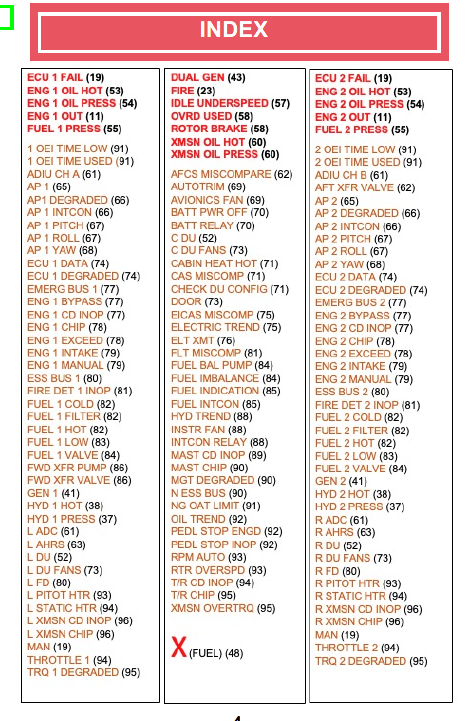
- Contents and index – Is the checklist broken down into logical sections? Are all procedures listed (the applicable drill was missing from the index in the Cougar 91 incident). Is an appropriate numbering system used? There is a huge opportunity to ease the task of a crew. For aircraft that present cautions in columns for left, right and non-handed systems, the index can be oriented to match this. This can be the singularly best upgrade an operator can do. Note under NVIS lighting, the red and amber can appear identical!
Checklist content
- Structure – number of actions minimised to take action of time available
- Instructions – appropriate notes to explain checklist design philosophy and clarify what Land as soon as possible, Land as soon as practicable and Land Immediately mean for the type.
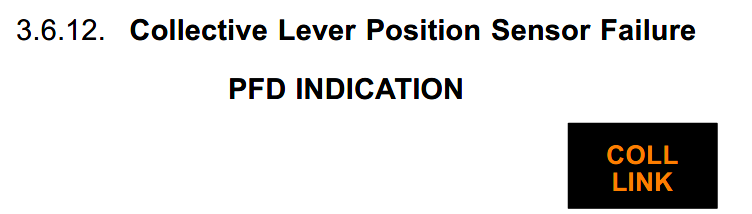
- Title – Each drill must have a title. Is it appropriate and unambiguous? (This is not the case for a COLL LINK failure on EC135/H145 which is listed as “Collective Lever Position Sensor Failure”). The title should reflect any caption the flight crew sees.
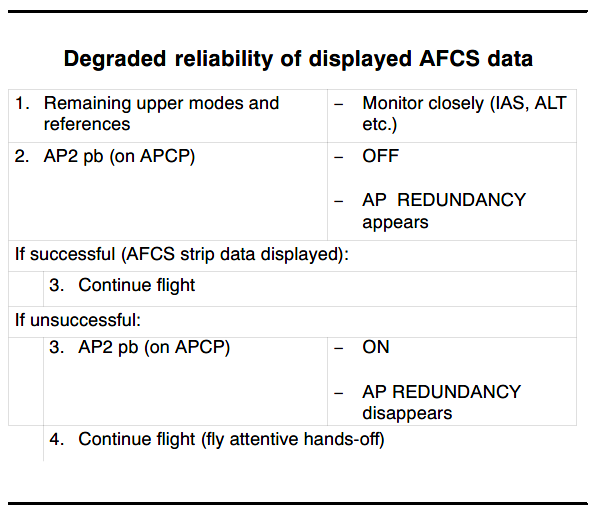
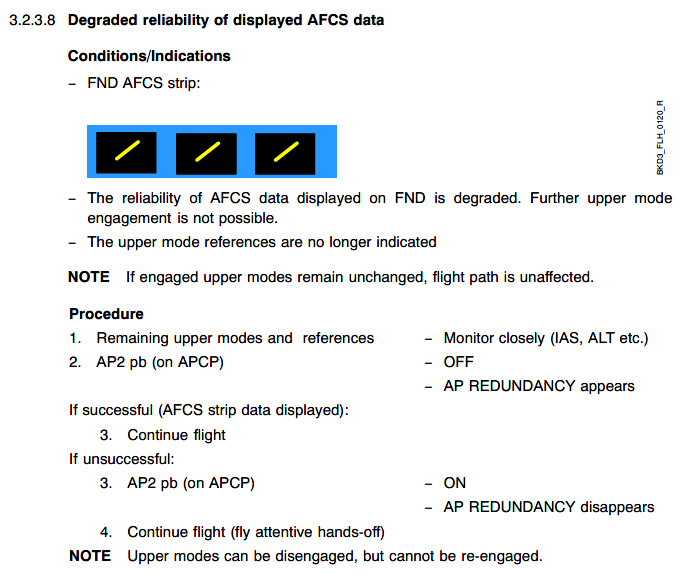
- Failure condition – Is there a description of failure conditions? Is there an illustration of failure conditions? (This is not the case for the 3 amber slashes failure on EC135/H145 which is listed as “Degraded reliability of displayed AFCS data”)
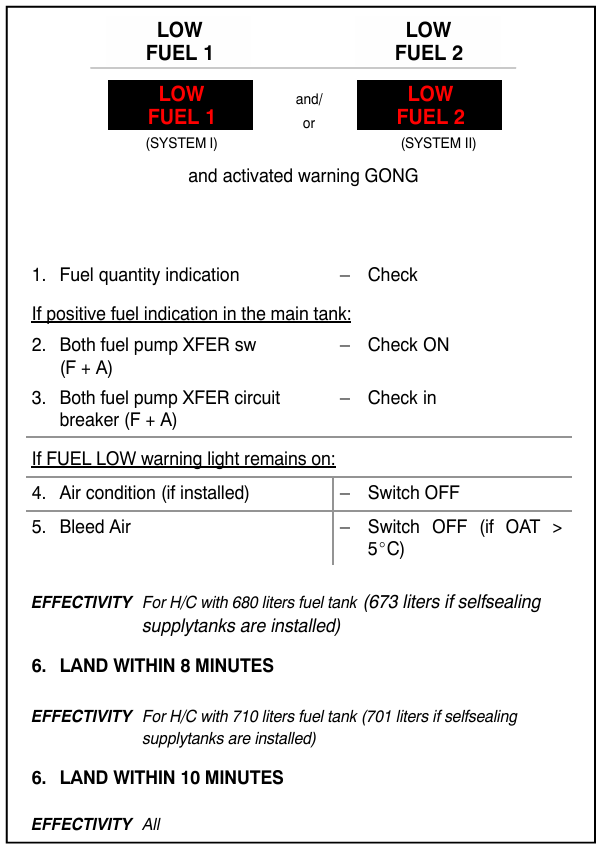
- Memory items – are memory items at the beginning of the drill? Are they clearly distinguished (eg Bold face)? This was not the case for the EC135 Low Fuel checklist at the time of the EC135 crash in Glasgow on 29 November 2013. It has now been corrected as the result of a customer TE.
- Notes – Are notes distinguished from actions?
- Action items – Are “read” and “do” linked (perhaps a dotted line)?
- Decision items – Are decision points clearly laid out?
Layout and format
- Drills per page – Are drills split across pages clearly shown?
- Start and finish – Is it easy to see when a drill is complete?
- Cross-referencing – Is cross-referencing easy to follow and are subsequent actions not orphaned by the move to another drill?
- Figures and tables – Are they easy to find from the relevant drill? Are they legible?
- Abbreviations – Are they consistent?
- Special cases – Are critical drills easy to locate (eg should a particular procedure be on the cover?)
There is a lot more depth in CAP 676. Fortunately such a useful resource is now not lost to history!
Improving on paper
We have excellent paper normal checklists that embody the principles in CAP 676. We have a customised book of emergency and abnormal checklists, directly applicable to the as-flown aircraft. They work in use and need no batteries. Why would we want to move to an electronic checklist?
Type of electronic checklist
First we need to clarify what we mean by electronic checklist. There are 2 possibilities:
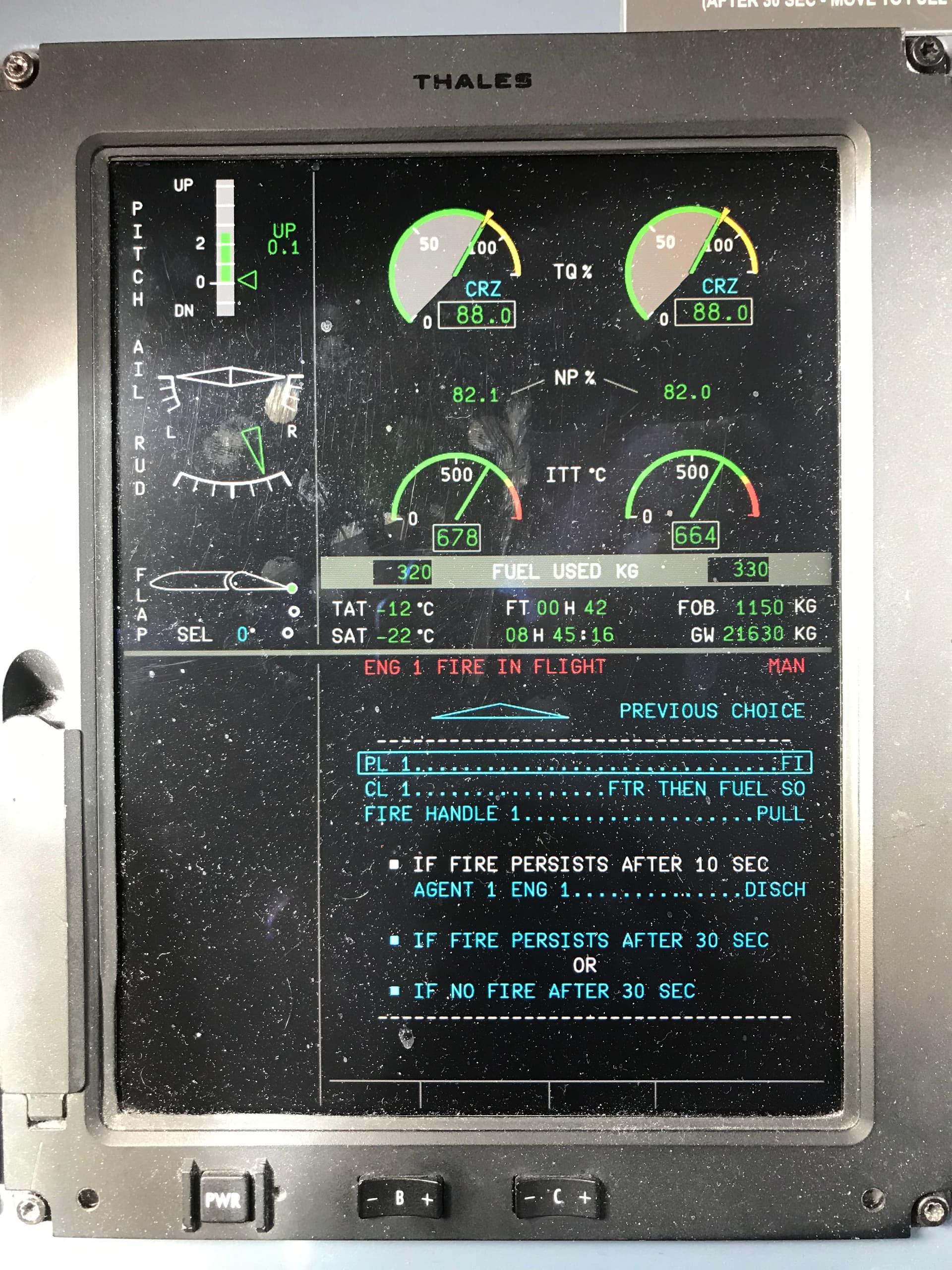
- Installed checklists – An electronic checklist hosted on the aircraft computers and display on the aircraft displays
- Tablet checklists – An electronic checklist hosted on an EFB
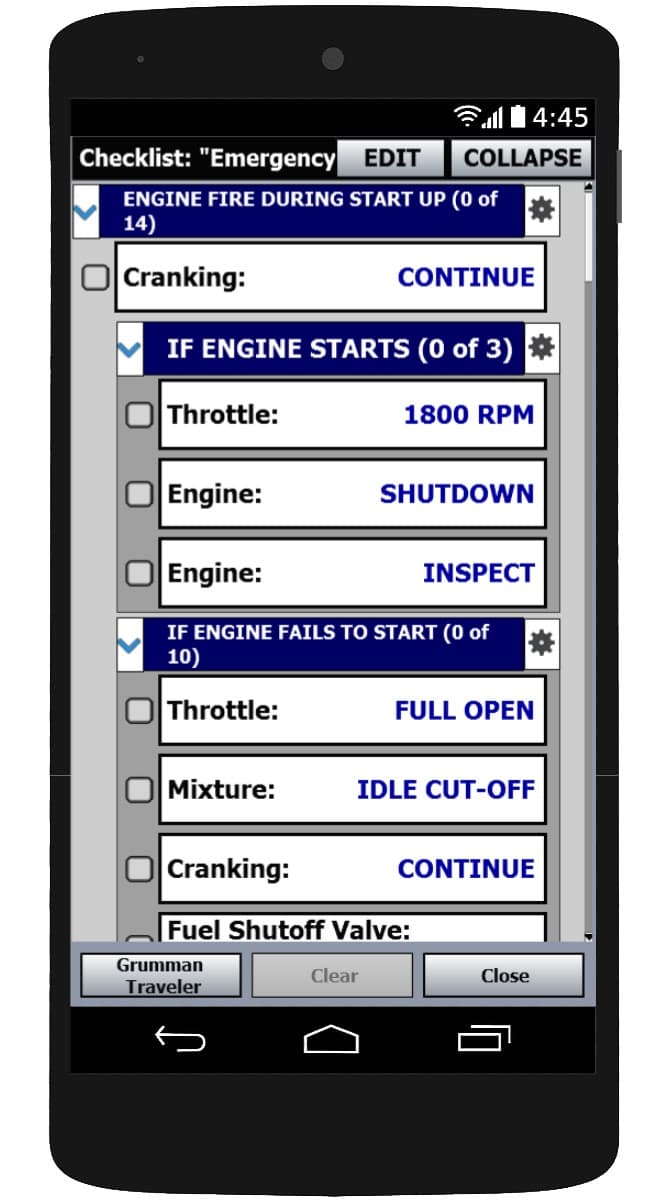
In this article, we are discussing only the latter option – a checklist hosted on a portable electronic device such as an EFB. Of note CAP 708 contains guidance for Installed Checklists but has some useful pointers for EFB checklists
Types of EFB electronic checklist
What options do we have for implementing our electronic checklist? The options vary in complexity:
- Simple PDF – a simple copy of the paper version of the checklist in PDF form, hosted on an EFB
- Augmented PDF – A PDF copy of the paper checklist with added features to improve usability such as hyperlinks, extra media and search options
- Dynamic checklist – Checklists hosted on an app which are presented dynamically based on user input and may have option trees the capability to check off items as they are completed (see example above).
So these options exist and require varying levels of effort to produce. But again, why bother? What does an electronic checklist bring to the party? What are the challenges?
Benefits and challenges of electronic checklists
What does an electronic checklist bring to an operation? Primarily we are focusing on EFB checklists here.
Benefits of electronic checklists
- Ease of distribution – Operators existing electronic document system can be used to distribute checklists across the operation
- Ease of amendment – A PDF file is easier (with caveats below) to amend and redistribute
- Integrity of amendment – Through extant operator processes there is only version in the operation – the one on the EFB. However, coherence with any backup paper versions is challenging
- Ease of viewing – An EFB will already be in position to be used by the pilot so the checklist should be in an optimal position
- Opportunity to augment checklist – Hyperlinks and additional media can transform the utility of a checklist
- Built in lighting – No supplemental lighting is needed to view a checklist. The EFB screen serves as the light
- Zoomable – Need more detail? You can zoom in on an EFB!
- Searchable – Even a simple PDF copy of the paper checklist is searchable provided it is saved appropriately. Any PDF should be made using text and not a scanned image of text. The text must be searchable to gain any advantage.
Challenges for electronic checklists
- Resilience – EFB have batteries which can run out or they can overheat or fail due to damage. A reliable backup is needed – either paper or another EFB with an independent power source
- Conflicting requirements on the EFB – An EFB is used for various things. If the EFB is being used for checklists, the moving map or ADS-B traffic display might have to be hidden
- Cost of software – Editing a PDF or creating a dynamic checklist requires more than free-to-use software. We recommend PowerPDF due to its one-off cost but other solutions are available.
- Coherence with paper backup – A paper backup of checklists may be needed in a resilient EFB backup is not available. Maintaining strict coherence between the electronic and paper forms of a checklist can negate many of the advantages
- Regulatory compliance – An electronic checklist still needs to be controlled in exactly the same way as a paper checklist which has to be in Part B of the Operations Manual. Again, the necessary change management process and approval from the authority can negate the ease of amendment of a checklist. Careful wording of the Operations Manual to refer out to the Checklist in a separate document might be appropriate
- NVIS compatibility – An iPad which has been made NVIS compatible will likely have a green NVIS filter on it. This could change all the colours in the document, making it unusable.
Regulations
What regulations do we need to consider when moving to a screen?
Regulations for electronic checklists – CAT
For CAT operations, the starting point is CAT.OP.MPA.141(b). This discusses use of EFB and specifies in AMC3 CAT.OP.MPA.141(b) that the operations manual is a Type B application (basically that means safety critical). That means its subject to an approval process as described in SPA.EFB.
If an operators already as EFB it is a modification of the extant approvals process they should have already completed. The relevant rules are in SPA.EFB.100. We will cover the approval process in more detail later.
Regulations for electronic checklists – SPO, NCC, NCO
The equivalent rules for SPO, NCC and NCO are in the following sections:
- Part SPO – SPO.GEN.131 – instead of needing to be approved, Type B EFB apps need to be risk-assessed. Role related checklist linked to the special operation may need to considered too.
- Part NCC – NCC.GEN.131 – instead of needing to be approved, Type B EFB apps need to be risk-assessed
- Part NCO – NCO.GEN.125 – The requirements at the Part NCO level are more permissive and there are no explicit requirements for use of electronic documentation on PED.
Basic EFB checklists – PDF
As a starter, let’s look at a simple PDF checklist first. Perhaps the normal checklist that is used for starting, stopping and in flight checklists.
The checklist will likely already exist as a PDF when they were originally created. However, the following points should be noted:
- Markup – A checklist page in an Operations Manual may have ancillary headers and footers which might not translate well to a hand held checklist. Should these elements be removed, there needs to be a very careful configuration management process to ensure the final PDF form is identical to the Operations Manual and is identical to any electronic version.
- Orientation – A PDF can easily reorientate pages for better viewing on a device. Typical pages are those with charts. A fairly simple edit might be to turn the landscape pages around before upload to a document. It may be quite challenging to turn a mounted EFB to read a page whereas this is simple in paper form.
- Downloads – Downloads by users can lead to a configuration nightmare. Old copies can proliferate. Operators should consider locking any download functionality in their document management system (this applies to all operational documents!).
- Accessibility – A checklist may be needed at quite short notice. The document should be accessible with minimal burying down in multiple sub-menus and folder structure. Checklists should be in their own folder at very top level. Once opened the instance of the document should persist on changing apps and back again. Ideally the normal and abnormal checklists should be possible to leave open simultaneously (perhaps in various “tabs” within one app). Even better if a shortcut can be added directly to the EFB desktop. This might be possible through the “Shortcuts” app on iPad but this is unlikely to work with popular document storage solutions like WebManuals and Centrik.
Augmented EFB checklists – PDF with extras
The PDF format started out as a way of taking a document on a computer and pushing it in a consistent way to a printer. However, it has been subject to continual development and that offers opportunities to exploit it for aircraft operations.
There are several avenues to improve upon paper.
Hyperlinks
Hyperlinks transform a flat PDF into an interlinked network of pages. The major uses of hyperlinks are:
- Indexing – the main index can link straight to the relevant page for the relevant procedure. Typically in PDF editing software a hyperlink is created as an area of the screen that corresponds to the relevant text. This generally needs very limiting prompting for crews brought up in the digital age.
- Cross-referencing – Some drills use cross-referencing to reduce repetition of the same information (and associated configuration control issues). However, unlike an index it may not be obvious to flight crews that a hyperlink exists. With that in mind, it can be helpful to box in any areas that can pressed to reach a cross link. Caution is needed here. Flight crew might move to the cross-link and never come back. Any critical steps that come afterwards may be lost. Consider putting any cross-links after the end of the drill unless the link takes the crew to a more appropriate drill with no need to come back.
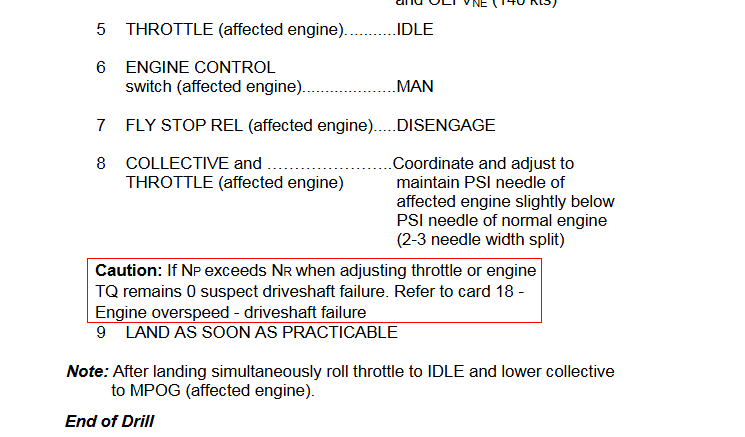
- Going home – Aircraft operation is never simple and it is likely that human error spices things up. With that in mind, it needs to be simple with an electronic checklist to go back to the start and look again for a different drill. A “Go Home button should be prominent on every page.
Additional Data
Having a PDF file may allow the addition of extra data via linked documents or images. Perhaps a sample of what the emergency looked like in an FSTD session could be inserted as a popup on the PDF?
However, caution should be exercises on this desire to provide more information. The checklist will likely being used under duress. Supplementary information might confuse the situation, distract the reader or cause unintended behaviour in the document viewer.
In simple terms, if it would not feature on the page in a page version, do not put it in the augmented PDF version.
Zooming
Knowing that a document can be zoomed, opens up some new possibilities. A diagram or image that would be hopelessly confused on an A5 paper checklist, might actually work quite well if a quick pinch-zoom expands the relevant section. A flow chart for example, which might be too complex at small size, might work perfectly well when the relevant area is zoomed in.
Effectively requiring crew to use a multi-finger gesture in a vibrating machine in a stressful situation might however be a bad idea.
Timers
An embedded timer could be included for any timed operations. For example, a minute of delay might be needed before firing off individual fire extinguisher bottles into the engine.
Dynamic Checklists
Dynamic checklists are those that leave the page behind and use a dedicated app to host a configurable checklist. Checklists can be expanded or shrunk like a drop-down menu on computer software. The format allows branching and dynamic generated content based on decision trees.
Dynamic checklists may be available through an app already included as part of an operation’s normal practice. For example, Foreflight and SkyDemon offer an easily accessible checklist module. In both cases, the apps offer the option to build a complete checklist for normal and for abnormal/emergency conditions. Each includes the capability to “tick off” items as they are completed. In the case of SkyDemon, situational awareness of location is retained in the main part of the screen.
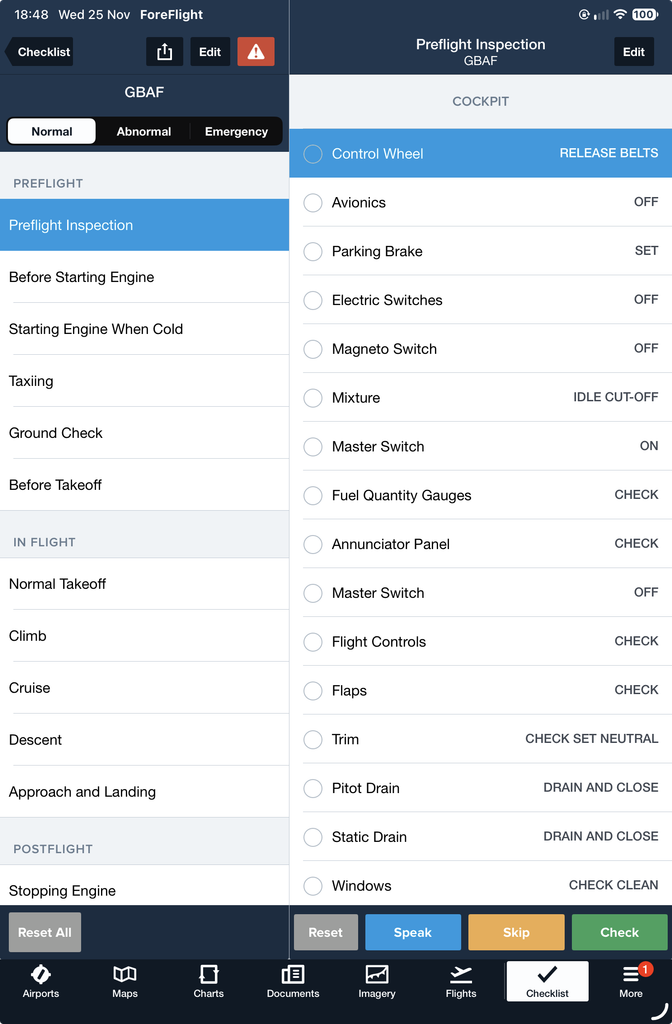
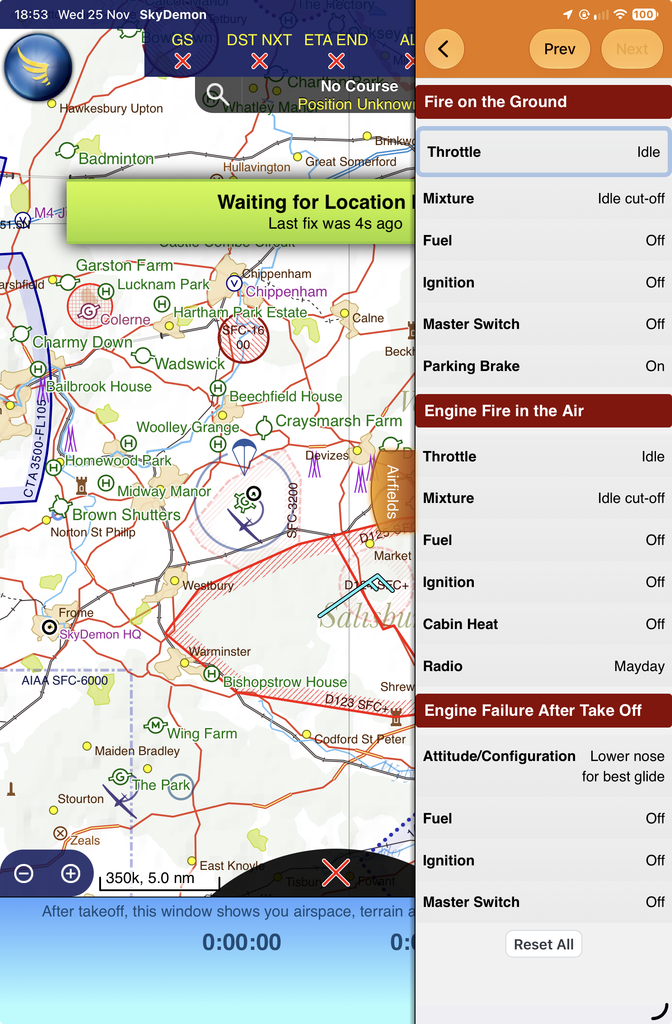
Alternatively, dedicated checklist apps are available. The Flight Simulation community is well served in particular by a variety of apps.
Regulatory compliance
Having a dynamic checklist might seem like a perfect solution. No extra app, highly configurable and easy to amend. However, there are some significant problems, particularly for more complex operations where approval or risk assessment is needed:
- Coherence – Maintained coherence between a dynamically generated checklist and paper backup would be extremely challenging. The formatting will be wildly different and crews would effectively need to train using both systems. The checklist also needs rigorous monitoring to ensure it matches the manufacturer documentation which will be in a completely different format. Picking up changes might be challenging.
- Ease of amendment – Anything which is easy to change will at some point get changed inadvertently. Someone might hit delete, idly tap in a wrong word or even maliciously change information as they have just been fired.
- Lack of context – A fixed page checklist allows contextual information to be added such as notes or pictures. This may not be possible in simple checklist modules bolted onto an EFB app used for navigation
However, for a small Part NCO operation, a dynamic checklist might be a very simple way to jump into the electronic age, particularly if the aircraft type is already included as a sample on the system. Just download and go.
Backup and resilience
So we have our nice new electronic checklist. Do we need a backup? We have a couple of EFB in the cockpit and they won’t all fail at once. Will they?
For CAT operations, the requirements are outlined in AMC1 CAT.GEN.MPA.180 which states:
The documents, manuals and information may be available in a form other than on printed paper. Accessibility, usability and reliability should be assured.
No further guidance appears to be provided on how accessibility, usability and reliability can be assured. However, if we remember we are planning to use an EFB, the solution emerges in CAT.GEN.MPA.141 and SPA.EFB.100 which covers use of EFB. All the relevant topic are covered.
In particular, a paper backup is king. As stated in AMC1 SPA.EFB.100(b)(1):
When the EFB system is intended to be introduced alongside a paper-based system, only the failures that would not be mitigated by the use of the paper-based system need to be addressed
So keep a paper copy and there is no risk to assess. This is grossly simplistic if only for the problem of coherence between the electronic and paper versions but a great go-to when the authority come looking!
Alternatively, with an adequate investigation of the risk, there remains a possibility that a purely electronic checklist might be acceptable – we will take a look at the process for proving that next. AMC3 SPA.EFB.100(b) states:
The operator may remove the paper backup once it has shown that the EFB system is sufficiently robust.
Implementing the change
So we are happy with moving to an electronic checklist and we are ready to introduce it. What hoops do we need to jump through?
Risk assessment
The starting point is a risk assessment completed through normal company methods. It needs to consider:
- Human-machine interface
- Accesibility
- Usability
- Reliability
- Failures and resilience
- Distribution
- Configuration control (updates, use away from a network connection)
- Coherence (paper vs electronic, company vs manufacturer)
Training Programme
A training programme is needed for all relevant personnel:
- EFB adminstrator
- Users
- Compliance manager
The training programme should include initial and recurrent training plus inclusion in any checking programme (such as OPC and line checks)
Operational Evaluation
An operational evaluation in accordance with AMC3 SPA.EFB.100(b) is needed to show the regulatory authority that the appropriate risk mitigations are satisfactory. Typically this begins in a simulator then progresses to the aircraft, with extant processes and documentation available as an immediate backup. A 6 month period might be required but shortly periods may be justifiable. If desired, it may be appropriate to remove a paper checklist entirely after a suitable period of time.
Conclusions
Let’s jump back to the tragic case of Cougar 91 before we conclude. As we mentioned earlier:
…the company emergency checklists in use by the crew were poorly indexed, confusing and were not consistent with the latest flight manual. In addition, the procedure in the latest flight manual was in itself unclear and was subsequently amended.
Making a checklist electronic in itself would probably not have made a critical difference in the situation the crew found themselves in. But maybe, just maybe, a smart electronic checklist with a search function and hyperlinks, the crew might have found the appropriate drill a few seconds faster and had a few more seconds to think around the problem and safely ditched in time.
But crucially an electronic copy of a poor paper checklist is not going to become suddenly amazing. A substantial amount of effort creating effective hyperlinks and preparing a PDF document are needed to make an effective leap to EFB-hosted checklists.
We have found its hard to go back once crews start using a properly hyperlinked checklist that’s easily accessible.
Have you made the leap?
Links
Note – All these documents are hosted by us and are not subject to amendment.
Note – these documents have been withdrawn by the CAA due to outdated references but the guidance is still valid.
CAP 676 – Guidance on the Design, Presentation and Use of Emergency and Abnormal Checklists
CAP 708 – Guidance on the Design, Presentation and Use of Electronic Checklists
These are links to other guidance in the USA and EASA.
AC 120-64 – Operational Use and Modifications of Electronic Checklists
AC 120-71B – Standard Operating Procedures and Pilot Monitoring Duties for Flight Deck Crewmembers
Now take a look at other posts
- From paper to pixels – creating a great e-checklist
- Downwash theory for pilots – what you need to know
- HEMS external cameras – a new normal?

- H145 Aerodynamic Tweaks Explained: Gurney Flaps and Tail Design

- FSTD Capability Signatures (FCS) – A hidden threat for training?

- Preparing for complete loss of engine power in helicopters

- Lessons in how to manage a helicopter engine malfunction

- Light twin helicopter AFCS – Have Airbus won the race?

- Maintenance by pilots – can the training be improved by sharing?

- Flight simulation revolution – A new method for matching training need to simulator capability

- Helicopter Single Engine IFR – New horizons

- Making the grade – understanding climb gradients in the go around

- Unfair Skies: Restrictive helicopter instructor rules and how to fix them

- How to create an instrument rating instructor (IRI) – A helicopter anomaly

- The evolution of Category A Helipad procedures – A strong foundation for VTOL to learn from?

Leave a Reply